My Music Library Manager
Bringing a capable player to life
With over 15,000 song titles in my library and a DAP (Digital Audio Player) that is capable of storing 256GB of music, the need for an automated process for moving music files from the computer to the player became apparent shortly after I obtained my FiiO X5 and X7 DAPs. Moving thousands of files by point-and-click was going to be an impossible task. Furthermore, with newer players emphasizing streaming capabilities over what FiiO now calls “Pure Music Mode,” I have a need to ensure that my current FiiO X5 and X7 players will remain useable over the long-term. The alternative is to purchase a player with streaming capabilities (capabilities that I would never use) at double-to-triple the price. For this reason, and simply because I desire to have 100% control over my music listening choices, I began going down the long road of developing my own way of managing the storing, organizing, and transferring of music files from the computer to the FiiO X5 and X7 devices.
As of August 7, 2023, the first release of the software for my Music Library Manager (in the form of a MS Excel VBA Macro) is now available on this web site. The software is available for anyone to use for their own needs. Since it seems that very few people have the same music listening habits and processes as I do, I seriously doubt that there will be many folks that will be inclined to take advantage of this software’s capabilities. However, if there is anyone that can use the capabilities of this software, I hope that this product meets your needs and you can benefit from using it.
The latest release is v1.0.1, released August 17, 2023.
I do have a several additional capabilities planned that I look forward to implementing at some time in the future. These capabilities include the Library Music Manager automatically generating playlists based on song tags created by the user and user-defined music selection criteria. Check in with this site occasionally to follow the progress in this area.
Your comments about My Music Library Manager are welcome
Overview of John's Music Library Manager
The graphic below presents an overview of My Music Library Management Process. Very nearly 100% of the music in my library uses the FLAC codec. I am able to capture songs from multiple sources, including CD, LP, and streaming sources. My FLAC Library is stored on a 1TB SSD drive on my primary computer, an HP Prodesk 400 G6. I use foobar2000 to create playlists manually. These playlists are processed by my Music Library Manager to be formatted for use on the FiiO X5 and X7 DAPs.
For music listening, I apply three primary modes of playback:
- Using foobar2000 to play songs directly off the SSD drive on the computer through the FiiO E17K DAC to desktop speakers
- Using foobar2000 to play songs off of an external hard drive containing a copy of the Music Library, connected to a laptop computer, through the FiiO E17K DAC to either my Toby loudspeakers or outdoor speakers
- The target approach is to use the FiiO X5 and/or X7 DAPs directly into a stereo amplifier (the X5 and X7 have onboard DACs) to either my Toby loudspeakers or outdoor speakers
I prefer to use method 1 when working at my desk. I use method 2as a workaround until my Music Library Manager is able to smartly move playlists and music files to the FiiO X5 and X7 DAPs. In outdoor or other situations away from my large stereo amplifier, I use a portable “digital” (Class D) amplifier, such as the SMSL-SA-98E or the Fosi Audio TB10A, both of which I use in different locations around the house to drive a pair of Bose desktop speakers.
For serious listening, I use my FiiO X5 and X7 DAPs connected directly to traditional Class A/B amplifiers to drive my Toby 2.5 pair or my Toby 2.6 pair for the best listening quality I can provide with the equipment I have.

I have prepared a presentation that breaks out the various threads of activity shown in the graphic above, to better explain the details of the process and better illustrate the usefulness of John’s Music Library Manager. Click on the document cover image to the right to download the document.

John's Music Library Manager App Release v1.0.1
Release 1.0.1 of John’s Music Library Manager is available here for download to anyone interested in using its capabilities, subject to the conditions of the End User Agreement. John’s Music Library Manager is a Microsoft Excel VBA Macro that can be run as a standalone VBA macro by launching it from a MS PowerShell script (included here). As this App is housed within a Macro-enabled Excel Workbook, it is highly recommended that you run the download through a virus scanner to ensure you are receiving a virus-free copy of the App. The Excel Workbook has been compressed into a Zip archive in order to upload it to this website. Simply unpack the archive, and the Excel Workbook App and the sample PowerShell launch script will be available to you.
While I have made every effort to provide a quality App for myself to use, I do not guarantee that this software will be free of any kind of faults or bugs. As I continue to use this App, I will be fixing existing bugs that I discover as well as adding new capability to the App. I am not a software professional, nor do I run a software production outfit. I built this App for my own use and benefit, and therefore, it is likely that I (and you as well) will find the occasional bug. As I said, I will be occasionally be updating the release of this App to address bugs that I discover. But, I will not be able to fix bugs or provide functional enhancements to this App on demand.
v1.0.1 is now released and fixes a few minor issues I discovered while using the app in the last couple of weeks.
I hope that someone is able to find that this App fits a need that they have to enhance their music listening pleasure.
Download John's Music Library Manager App Here !!!
Pressing this button will provide you with a Zip archive that contains John’s Music Library Manager as a macro-enabled Microsoft Excel Workbook and a sample PowerShell script for launching the macro that runs the App. It is highly recommended that you run the Zip archive through a virus scanner to ensure you have a virus-free copy of this App. Unpack the Zip archive and place the App and the sample PowerShell script in a known location. The sample PowerShell script will need to be modified to indicate the location in which you placed the App. A guide for getting up to speed using the App is provided below for download. This guide describes how to organize the App along with your music files and playlists, to take best advantage of the App’s functional features.
The Zip archive contains a changes log that details the changes made since the last release.
Getting Up and Running with John's Music Library Manager
This presentation will help you get oriented toward setting up your system for running John’s Music Library Manager for the first time. This presentation addresses installing and launching the App, as well as the file structure that the App expects to see in order to correctly locate music files and playlist files.

User Manual
Here is the latest version of the User Manual for John’s Music Library Manager App. Updates will be provided as new material is added or existing content changes.

User Interface Screenshots
Now that John’s Music Library Manager is finally released, I intend on updating/creating a User Manual that addresses the latest features coded into the App. Additional work is required to validate the performance of the App with the FiiO X5 and X7 music players. There will still be a need to do some code cleanup, and as this occurs, I hope to be publishing regular updates to the software release.
Below are screenshots of the VBA user interface forms. These are snapshots taken some time ago, and they need to be updated to the current release, and I will be undertaking that activity soon. Unless noted otherwise, these are representative of the forms at initialization and lack the view of additional controls that are enabled when the user takes actions within the form. Additional screenshots will be taken in the coming weeks to illustrate the released software in action.
Main User Form
This is the form that is presented upon opening the workbook. My Music Library Manager supports the following main processes:
- Synchronizing the Library’s descriptive contents (music file database) with the actual music files on the computer’s Solid State Drive
- Facilitating the application of tags onto the music file entries in the workbook database
- Automatically creating playlists based on the user’s selection criteria (a future planned capability)
- Managing the construction of FiiO-formatted playlists, including assuring that songs in the playlists currently exist in the Library
- Managing the state of playlists and music files on Micro SD Cards used by the FiiO X5 and X7 that I use for music listening
Additional forms open based on the choices made by the user.

Music and Playlist Library File Hierarchy Validation
This capability will be the target for the Version 2 release of John’s Music Library Manger. The objective of this function will be to check that 1) the Music and Playlist files have names that conform to the naming conventions I am using in my Library, and 2) the Library file hierarchy conforms to the strict structure required for this application. The function will notify the user of any discrepancies so that the issues may be addressed.
Synchronize the Workbook Database with the Music Library
In this process, the Music Library Manager scans the Workbook Database and compares the contents against the Music Library. Exceptions are tallied and reported to the user for resolution. The user is able to accept new Music Library song files into the Workbook Database, and to also remove unmatched entries (that have no matching song file in the Music Library) from the Workbook Database. This functionality relieves the user from having to perform manual maintenance on the Workbook Database to keep it in sync with the contents of the Music Library.

Edit Music File Tags
Tags are a way of creating attribute that are associated with music files. Tags can be a means by which certain songs are be selected over others.
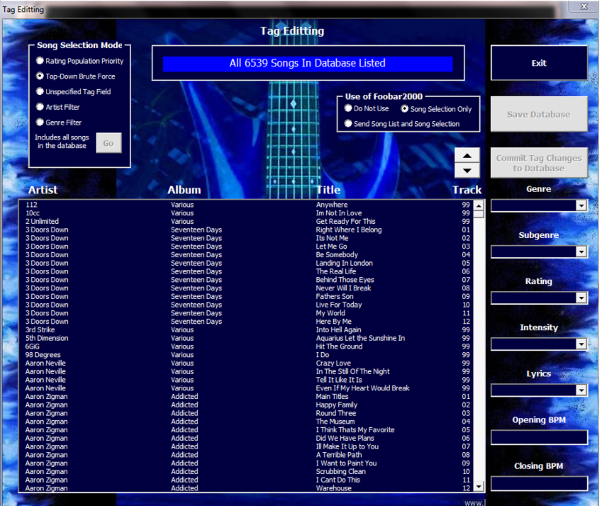
With the Tag Editing process, the user is able to apply tags to entries in the Workbook Database. Using the form, the user can select from among several criteria to filter the song entries in the Workbook Database that are reviewed by the user for the purpose of editing the songs tags.
It is planned to use tags to perform the automatic selection of songs for placement in playlists according to user selected criteria (primarily tags).
This particular image is a screenshot of the form in use some time ago when I was adding tags to music files.
Manage Playlists
In this process, playlists are read and checked to ensure that there are no file syntax anomalies in the file. The list of songs contained in each playlist are then checked to ensure that the songs exist in the Music Library. Once all checks are completed, the playlist is reformatted into the format acceptable by the FiiO X5 and X7 players.

Manage FiiO Files and Playlists
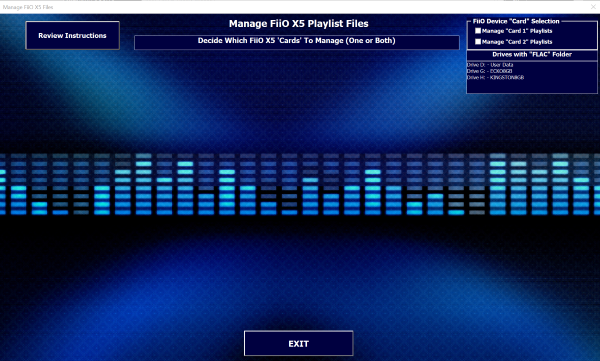
With this capability, the user is able to control the selection of playlists (and associated songs) that go onto one or both Micro SD Cards of the FiiO X5 and X7 players. The software includes a feedback mechanism to inform the user how much of the drive’s space is available for inserting more playlists. As a playlist is placed on an SD Card, a status bar in the form is updated to indicate how much space is left on the card for the user to use.
This is the module that I have been working hard on in June/July 2023 to complete so that I can start populating the SD cards I have for the FiiO X5 and X7 DAPs. It’s hard to put an estimated completion date on this activity because the time I can dedicate to this task depends on other things going on around the house. Also, since I have never built a tool like this before, I find that I am designing as I go. Thus it is hard to predict exactly how much effort is remaining to be completed. But, just a rough guess, I believe I will be ready to start populating the SD cards with a massive amount of song data by the end of August 2023.
Auto-Generate Playlists
This capability has not yet been developed. It is planned for a future addition to the capabilities of this Music Manager. The concept is that, based on user criteria selection, the software would select songs to fit a cycle of songs moving from “low-energy” to “high-energy” selections, and back. This requires that songs be tagged with the tags that are the basis for song selection by the auto-generate algorithm.
So, before this auto-generate capability can be fully implemented and used, the Library entries need to be so-tagged. This will be a significant effort and will take time to accomplish. I have already begun to develop tags for songs, but there is yet a long way to go to tag the songs of primary interest to be considered by the auto-generate algorithm.

Music Listening Gear
FiiO X7 DAP
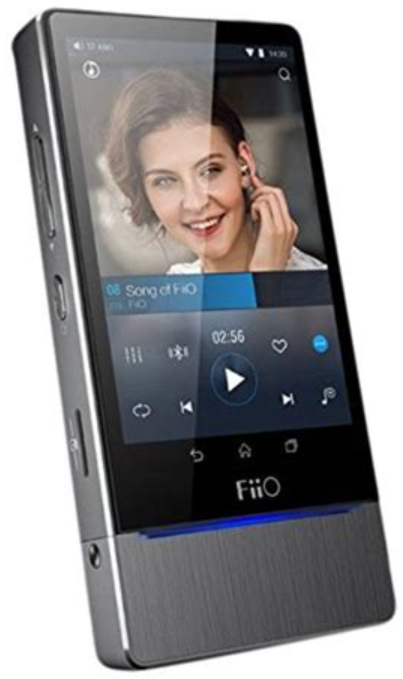
I purchased the FiiO X7 with AM2 amplifier module in 2022 for $400. The device is a bit antiquated now (vintage 2016 for around $650) as many players are moving in the direction of streaming-based music listening. This is a trend that I am definitely not interested in. My music listening habits are in direct odds with those that music streaming supports. I have my distinct song favorites that I tend to listen to over and over again. I listen to music until it sinks into my bones and I understand and feel the music in my soul. Therefore, I tend to be a rather boring music listener for others, listening to the same material repeatedly. I believe that streaming services do have the advantage of exposing a listener to new material, which I admit I take advantage of. But I want 100% control over the music I listen to, and I feel very comfortable with my computer-hosted playlists and music library that I can draw on at will and with full control at any time.
The FiiO X7 is probably one of the last audiophile-level-quality music players that is built primarily to support playlist and music library-based music listening. I feel lucky to have found my X7, as they are becoming increasingly difficult to locate.
The available documentation is old and outdated. I struggled desperately to figure out how to update the Android OS so that it would function as a music player. In addition, the available documentation describing the UI is outdated. I took it upon myself to document the UI as I have had to learn by myself, with some difficulty, to use the machine with the current installed OS.
Unfortunately, I did not keep up-to-date notes during the process of upgrading the FiiO X7 OS and Firmware. But, I believe I have enough background material that I can probably reconstruct the process. I will attempt to do so, when I have no other more urgent tasks to perform.
These documents are made available here in the very rare case that someone might be needing the same information (HIGHLY unlikely.)

FiiO X5 DAP
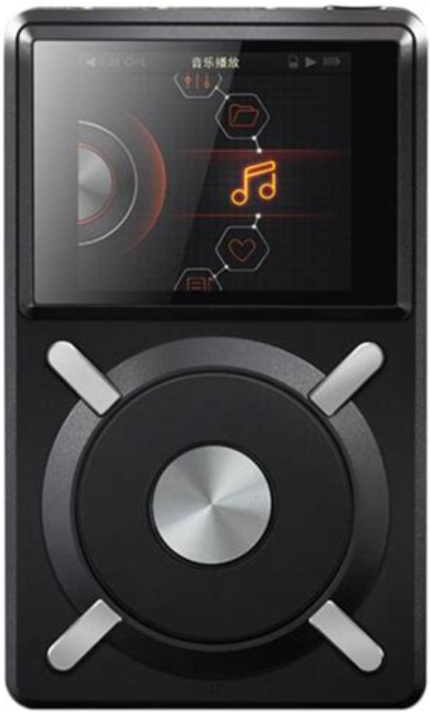
I purchased this FiiO X5 DAP in 2014 for $350. It is, in my opinion, still an excellent audiophile-quality music player. The only problem I have had with it is the antiquated mechanical jog wheel. But, since all my listening is playlist-based, I only use the jog wheel to set up a listening session, and then let the machine run without further interaction with the device. My favorite playlists are designed to run about 5 hours – the longest I would expect to entertain folks in my home. So, after using the jog wheel on this device to set up a listening session, no further use of the jog wheel is required. I am hoping to keep my FiiO X5 running for a long time into the future, if the jog wheel can hold up.
The UI documentation I have from FiiO is up-to-date, but it is a bit difficult to read. I intend on producing a UI document for this device, similar to what I have done for my FiiO X7. Standby for this posting, on the very rare occasion that you might be looking for such documentation on an antique like the FiiO X5.
Incredibly, you can still find this DAP on eBay for anywhere from $150 to $400 (summer 2023). Personally, although the playing quality of my device is superb, I would not spend this amount of money now on such an old device with a hardware jog wheel that has reliability issues. Anyway, a few FiiO X7s are still available (X7 on Amazon for $300, AM2 at B&H for $100, as of summer 2023). I might consider getting one more as a backup should my X5 jog wheel fail completely and I find myself with only one DAP when I sometimes use two DAPs for parties.
FiiO Alpen 2 E17K USB DAC
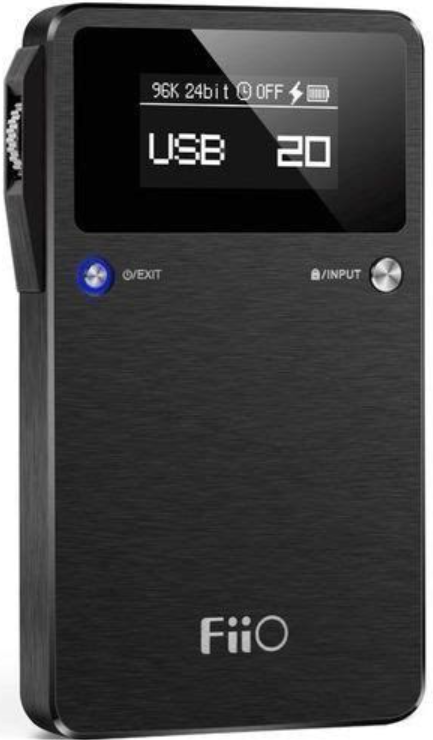
I purchased the FiiO Alpen 2 E17K USB-based Digital-to-Analog Converter (DAC) in 2016 for $145 to serve as a DAC between my desktop and laptop computers and my stereo amplifiers (both large standard analog amps and tiny digital ones). While the E17K has additional functionality, I really only use it as a DAC and nothing more. The E17K has excellent reviews and I have complete faith in its ability to perform the A-to-D conversion accurately.
This DAC is still available used on eBay for anywhere from $50 to $150. Personally, I don’t trust purchases of electronics on eBay. And anyway, there are other new DACs available today at reasonable prices. Amazon has several FiiO DACs available, like the Q11 for $90.
Additional Notes
FLAC Codec
Ever since I began collecting digital music, I decided to investigate the pros and cons of using compressed codecs such as MP3. Based on what I read, I decided to try to avoid compression all together. During this investigatory process, I learned about the Free Lossless Audio Codec (FLAC) codec. Ever since then, I have been collecting new audio or transforming existing audio to the FLAC codec for use in my music library.
To find out more about the FLAC codec, go to xiph.org.
foobar2000
foobar2000 is an advanced freeware audio player for the Windows platform. Ever since I started collecting digital music, I decided to investigate playing music on my Windows devices. I compared several audio players and settled on foobar2000.
foobar2000 allows the user to customize the user interface, a capability I am not very interested in. My interest is simply to play music on my machines using a trusted and capable audiophile quality player. foobar2000 more than meets my needs.
foobar2000 has an extensive library of add-on “components”, some of which I am using, such as advanced playlist management features.
I have recently learned that foobar2000 supports customized tagging, so before I expend a great deal of energy adding an auto-generated playlist feature to My Music Library Manager, I intend on further investigating the foobar2000 tag management feature to see a) whether this would support my tagging needs, and b) whether and how it would be able to integrate with My Music Library Management software.
To find out more about foobar2000, go to foobar2000.org.
MilkDrop

NEW NEWS: MilkDrop 3 has been released. I am still learning about its new capabilities, but they do sound kind of exciting:
- You can mash two presents together
- The new version provides a higher degree of user control
- And, tighter integration with DAPs such as foobar2000
MilkDrop v3.28 is now available at https://github.com/milkdrop2077/MilkDrop3/releases
MilkDrop is a hardware-accelerated music visualization plugin for Winamp that was originally developed by Ryan Geiss in 2001. (Wikipedia)
I discovered MilkDrop many years ago, but at that time, the performance of my feeble computing hardware could not provide the horsepower needed to effectively run MilkDrop.
I have since discovered that foobar2000 supports MilkDrop 2 visualization. I have gone through the tricky process of enabling MilkDrop 2 to run through foobar2000, and have since collected an extensive library of presets, that I am currently reviewing to retain in a final collection for use in experiencing music visualization.
To learn more about the “legacy” MilkDrop, go to geisswerks.com.
In 2024, I updated to MilkDrop 3.x, and the installation process has been simplified TREMENDOUSLY, to the point where it is no longer a topic worth addressing.
MilkDrop “presets”
Presets (*.milk) are the detailed instruction files (MilkDrop visualization execution code) that tell MilkDrop what visualizations to render. These are largely created by individuals with experience in creating these visualizations and posted online for public access. I currently have a collection of over 13,000 publicly available presets (most of which come from a set called “Cream Of The Crop”), and I am currently (2025) reviewing them all to select what I consider to be the best of all these to make accessible to the MilkDrop rendering engine.
My intention is to eventually purchase a high-quality projector to project these visualizations onto the interior ceiling of our house (indoor parties) or an exterior wall of our house (yard parties), and have Foobar2000 provide the audio source to drive MilkDrop’s visualization reaction to that source.
My current computing hardware seems to have the horsepower to run Foobar2000 and MilkDrop without any rendering quality issues. But if necessary, I may need to purchase a special machine for these visualizations with a dedicated high-end graphics board.
I plan on making my final selection of presets available here on this website for others to view what I consider the best of the best when it comes to MilkDrop presets that I have come across publicly.
I am also collecting information on the authoring of preset files to eventually refine some of these presets. This is simply an item of curiosity on my part, as I have no intention (at this time, at least) of spending a great deal of time authoring presets. I simply wish to be somewhat familiar with the authorization process.
Audacity

Audacity is a free and open-source digital audio editor and recording application software. I use Audacity for recording songs from LPs and from streaming sources. I also use Audacity for fairly straight-forward tasks such as editing existing songs to adjust volume, equalization, etc. as well as somewhat more complicated tasks as reconstructing a song to add verses, etc. I have successfully repaired many problem issues with songs using Audacity. Sure, there are other, more capable and professional music editors out there, but Audacity serves my needs very well.
To learn more about Audacity, go to the Audacity website.
Here are two examples of some of the products of my editing work that I have undertaken to enhance songs (in my own way). All these songs are in FLAC format. They can be easily read by most players, or easily converted to .wav or other format.
The first example (Summer In The City, by The Lovin’ Spoonful), is a song which I have thoroughly enjoyed since my teen years.
Summer In The City_Original.flac
I have always thought the song was too short, so I improvised an additional verse with an interesting twist to keep current with modern times. There is a little bit of undesired bleeding over of the end of one verse as the new verse begins. I may revisit this work sometime to do a better job at editing this piece.
Summer In The City_With Additional Verse.flac
The second example (Somebody To Love, by Jefferson Airplane ), is a song that I have always felt needed a proper intro section. As is, the song starts out cold, and jumps right into the main theme.
Somebody To Love_Original.flac
After sectioning the song in Audacity and selecting bits and pieces that could be used to form an intro, the product, I believe, is a much more pleasing, and complete work. See what you think. I played around with the beginning, maybe a little too much. I will consider redoing this sometime in the future.
Somebody To Love_With Intro.flac
I also use Audacity to remove noise and scratches from audio captured from LPs. I have become pretty good at identifying scratches on LPs, which have a fairly repeatable profile. It is so repeatable, that I am considering a project in the future to write code for Audacity that will identify scratches automatically and remove them automatically. For the moment, I am removing scratches manually, but this is an extremely time-consuming and laborious task.
I am currently working to cleanup a recording of my High School Stage Band (a couple of years before I was good enough to play in the group) at a jazz band competition held for competing high schools in the New Orleans area. Since this is a rather short recording (about 8 minutes long), I believe this is a doable task. Also, this is such a prized recording for me, that I deem the effort worthwhile. I will post a before/after example here in the future for you to compare for yourself.
Exact Audio Copy (EAC)

Exact Audio Copy (EAC) is a CD ripping program developed by Andre Wiethoff. EAC is used to convert the tracks on standard audio CDs to WAV files, which can then be transcoded into other formats, including lossless ones such as FLAC using external encoders.
To learn more about EAC, visit EAC’s website.
I have used EAC to rip my entire CD collection of over 500 CDs. EAC has superior professional control features, which I am hardly qualified to take advantage of. EAC has been able to recover data from some badly scratched CDs of mine. I will say that from my experience, the better the DVD/CD drive, the better EAC will be able to perform its task. I have gone through three CD drives in the process of ripping my entire CD collection. I can tell you that CD drives degrade slowly without clear indication that they are doing so. Whenever it came to a point that I was struggling to rip CDs, I resorted to using a new CD drive, and observed marked improvement in EACs ability to rip CDs. However, I have not been able to yet ascertain why a few CDs will rip at high speed (about 10x) while most CDs rip at normal speed (about 3x).